Android
- Minimum Android version: 10
- Recommended browsers: Chrome (current version)
- Recommended devices: Samsung Galaxy S20, Google Pixel 5 or later
App at Luckymate in Australia: Mobile Version Explained
The full Luckymate casino — 1,500+ pokies, live Evolution Gaming tables, PayID deposits, and AUD banking — loads instantly in your mobile browser on iOS or Android. No download, no installation, no barriers.
How to Start Playing on Mobile
Mobile Platform at a Glance
Pros
Cons
The Full Casino in Your Browser
The full Luckymate casino — 1,500+ pokies, live Evolution Gaming tables, PayID deposits, and AUD banking — loads instantly in your mobile browser on iOS or Android. No download, no installation, no barriers.
Play on Mobile Play should stay entertainment, not income. Open to players 18 and over only. Bonus offers carry their own terms.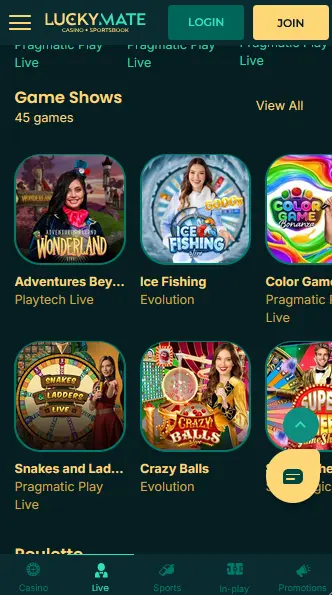
Safe Mobile Gaming
What You Should Do
What You Should Avoid
Device Requirements
Android
iOS
What the Mobile Platform Delivers
Full Lobby, Zero Downloads
Every pokie, live table, and sportsbook market available on desktop loads in Safari or Chrome on any compatible iPhone or Android. The HTML5 engine adapts to any screen size without losing speed or function.
PayID Deposits in Under a Minute
The mobile cashier supports PayID via NPP/Osko. Deposits clear in under a minute, and your AUD balance updates immediately, so you can jump into Mustang Gold or a live Evolution Gaming table without delay.
TLS Encryption on Every Session
The same TLS encryption that secures the desktop session protects every mobile login, deposit, and withdrawal. Account monitoring runs continuously, flagging unusual device or location access.
Luckymate’s mobile platform is a browser-based experience that delivers the complete casino without requiring a download from Google Play or the App Store. The platform runs on HTML5, which means the full game library, cashier, live casino, and sportsbook adapt to any screen size automatically.
Every section of the desktop site is accessible from the mobile browser. The pokies lobby, with over 1,500 titles from Pragmatic Play, Play’n GO, NetEnt, Big Time Gaming, and other studios, loads with the same speed and game fidelity as on a computer. Search, category filters, and a favourites function help players find titles quickly on a smaller screen. The AUD cashier supports PayID, Visa, Mastercard, Neosurf, bank transfer, and selected cryptocurrencies. Account management, KYC document upload, deposit limits, and bonus activation are all available from the browser session.
There are no functional differences between the mobile browser experience and the desktop version in terms of game availability, cashier options, or account features. The layout reflows to suit the screen width, and touch controls replace mouse interactions. Live dealer tables from Evolution Gaming stream in portrait and landscape orientation. The absence of a native app means the platform does not send push notifications and does not retain a persistent session between browser closures the way a downloaded app would.
The mobile platform runs on any modern smartphone or tablet. The minimum requirements below reflect what the HTML5 platform needs to run smoothly.
Android 10 or above is required. Chrome is the recommended browser. Devices from Samsung (Galaxy S20 and later) and Google (Pixel 5 and later) are confirmed to run the full lobby and live dealer streams without performance issues.
iOS 15 or above is required. Safari is the recommended browser, as it is the default on all iPhones and iPads. The iPhone XR and all later models, as well as the iPad Air (3rd generation and later), fall within the supported range.
| Specification | Android | iOS |
|---|---|---|
| Minimum OS | Android 10 | iOS 15 |
| Recommended browser | Chrome (latest) | Safari (latest) |
| Minimum RAM | 3 GB | 3 GB |
| Connection | 4G / Wi-Fi | 4G / Wi-Fi |
The mobile lobby mirrors the desktop catalogue across every game category.
All 1,500+ pokies are available on mobile. Titles like Mustang Gold and Wild Wild Riches from Pragmatic Play, Book of Dead from Play’n GO, Dead or Alive II from NetEnt, Bonanza Megaways from Big Time Gaming, and Razor Shark from Push Gaming (96.70% RTP) load directly in the browser with no plugin required. Bonus rounds, free spin features, Megaways mechanics, and bonus-buy options all function identically to the desktop versions.
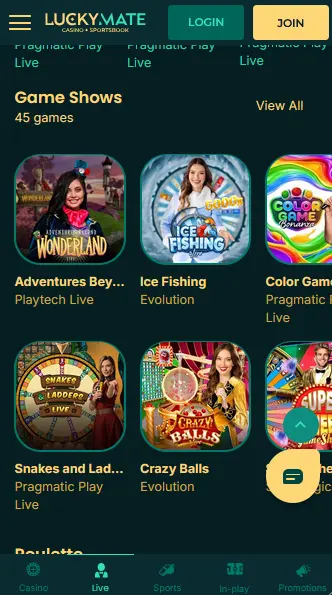
Evolution Gaming’s live roulette, blackjack, and baccarat tables stream in real time over a 4G or Wi-Fi connection. Winfinity’s 500x Auto Roulette and Luxe Blackjack 9 are also accessible. The live dealer interface scales to the phone screen with betting controls positioned at the bottom of the display for comfortable thumb access. Dragon Tiger and other Evolution Gaming table variants are available within the same live casino section.
Digital roulette, blackjack, baccarat, and video poker are all accessible from the table games category on mobile. Demo mode is available on eligible titles, allowing you to try a game at no cost before switching to real-money play.
Progressive jackpot pokies, including Mega Moolah and other network jackpot titles, are playable on mobile. The jackpot ticker displays current prize pool totals in AUD in the lobby.
Luckymate does not have a native app to download. The installation process is simply opening a browser and navigating to the site.
Open Chrome on your Android device, navigate to luckymateplay.com, and log in or register. To create a quick-access shortcut, tap the three-dot menu in Chrome and select Add to Home Screen. A shortcut icon will appear on your home screen and open the mobile casino directly with a single tap.
Open Safari on your iPhone or iPad and go to luckymateplay.com. Log in or register. To save a home screen shortcut, tap the share icon (the box with an arrow pointing up) at the bottom of the Safari toolbar, then tap Add to Home Screen. Name the shortcut and tap Add. The icon appears on your home screen and opens the mobile casino in Safari.
The method above works as a Progressive Web App shortcut on both platforms. The shortcut behaves like an app icon — one tap opens the full mobile casino without typing a URL. No app permissions are required, and no storage space is consumed beyond the browser cache.
All payment methods available on desktop are fully accessible through the mobile cashier.
PayID via NPP/Osko is the fastest option, with deposits clearing in under a minute. Visa and Mastercard are accepted alongside Neosurf vouchers, bank transfer, Skrill, Neteller, and selected cryptocurrencies including Bitcoin and Ethereum. The minimum deposit across all methods is $20.
| Method | Deposit Speed | Withdrawal Speed |
|---|---|---|
| PayID | Under 1 minute | 1–3 business days |
| Visa / Mastercard | Instant | 2–5 business days |
| Skrill / Neteller | Instant | 1–3 business days |
| Bank Transfer | 1–3 business days | 3–5 business days |
| Cryptocurrency | Minutes (blockchain) | Minutes (blockchain) |
Every transaction through the mobile cashier is protected by the same TLS encryption used on desktop. Payment method details are not stored on the device. The mobile cashier requires re-authentication before processing any withdrawal.
Both registration and login are fully functional on mobile, and KYC document submission can also be completed from a phone.
Tap the register button on the mobile homepage. Complete the sign-up form with your email address, a password, your name, date of birth, and country of residence. Confirm your email via the link sent to your inbox. Your account is active and ready for a first deposit within two minutes. Players must be 18 or over.
Tap the login button, enter your email and password, and tap sign in. The platform authenticates the session and opens the lobby. For troubleshooting common login issues, see the Luckymate login page.
Every bonus and promotion available on the desktop site is accessible through the mobile browser. No separate mobile account or mobile-specific registration is required.
The four-deposit welcome package — 150% up to $1,000 on the first deposit plus 150 free spins on Mustang Gold by Pragmatic Play, followed by three further matched deposit stages — is claimable from the mobile cashier exactly as it is on desktop. Make a qualifying deposit of at least $25 through any eligible payment method and the bonus is credited automatically. 18+. 40x wagering applies.
For the full terms of all welcome and ongoing promotions, visit the bonus page.
Mobile sessions at Luckymate carry the same security protections as the desktop platform.
TLS encryption is active on every page load, login event, and transaction. The connection between your browser and Luckymate’s servers is encrypted end-to-end, protecting your personal details and payment information from interception on the network.
Two-factor authentication is not currently listed as a separate opt-in feature on the AU-facing platform. Account security relies on a strong, unique password combined with the platform’s session monitoring and device-anomaly detection.
Native biometric authentication (Face ID or fingerprint) is not a dedicated login feature of the browser-based platform. However, if your phone’s browser or password manager supports biometric autofill, you can use your device’s built-in biometric prompt to autofill your Luckymate credentials at the login screen.
The full support offering is accessible from any mobile browser session.
Live chat is available 24/7 through the chat icon visible on any page of the mobile site. Email support is available at [email protected], with responses typically arriving within 24 hours. Both channels are staffed with coverage across AEST and AEDT time zones.
Deposit limits, session time limits, cooling-off periods, and self-exclusion tools are accessible from your account settings on mobile. If gambling is affecting your wellbeing, these tools are available at any time. Support organisations for problem gambling are available across Australia.
Mobile Play Questions
Not currently. Luckymate runs as a fully optimised mobile browser experience on iOS 15 and Android 10 or above, so no app download is required to access pokies, live tables, or the cashier.
Yes. In Safari, tap the share icon and select Add to Home Screen. This creates a shortcut icon that opens the mobile site directly, behaving similarly to an app without any installation.
Yes. The live dealer tables from Evolution Gaming and Winfinity are optimised for mobile streaming and run reliably on a standard 4G connection. Wi-Fi will give a marginally smoother experience during peak network hours.
Play Luckymate on Your Phone Now
Grab 150% up to $4,000 and 150 free spins.
Enter the Casino Play should stay entertainment, not income. Open to players 18 and over only. Bonus offers carry their own terms.